From quote to invoice without retyping a line
The accepted quote already holds the customer, the scope and every priced line. Reuse them, deduct the deposit you took and add any changes the customer approved.
- Electrical job worked through from quote to final bill
- WhizInvoice converts accepted quotes in one click
- One free file that holds both documents
What changes between the quote and the invoice
Moving from quote to invoice should take minutes, not an evening of retyping. The accepted quote already holds the customer, the scope and every priced line, so the invoice reuses them, deducts any deposit you took and adds the changes the customer approved. This page shows the steps, a worked example with real numbers and a quote and invoice template to start from.
A quote is an offer that asks the customer to agree to a price. An invoice is a request for payment once the agreed work is done. Converting one into the other keeps the customer, scope and lines, changes the title, number, dates and payment wording, and accounts for any money already received.
| Field | On the quote | On the invoice |
|---|---|---|
| Title | Quote, Quotation or Estimate | Invoice |
| Number | Q-1187 | INV-0452, with Quote ref: Q-1187 |
| Dates | Issue date and valid until | Invoice date and due date |
| Lines | Everything priced, optional items shown | Only the work done and accepted |
| Optional items | Listed, left out of the total | Included only if the customer chose them |
| Deposit | Deposit to book, as a request | Deposit received, deducted from the total |
| Changes | Not shown | Approved change orders as extra lines |
| Closing wording | How to accept | How and when to pay |
How to convert a quote to an invoice, step by step
Always work from the accepted version of the quote, never an earlier draft. These six steps keep the numbers traceable from the price the customer agreed to the amount they now owe, and that traceability is what heads off most payment queries before they start.
- Find the accepted versionThe signed PDF, or the version the customer accepted online. Note its number and the acceptance date.
- Carry the details acrossCustomer, job address, scope of work and every priced line, with the same quantities, units and rates.
- Settle the optional itemsKeep the optional lines the customer chose as normal lines and delete the rest.
- Add approved changesEach signed change order becomes its own line with its reference, such as CO-1.
- Retitle and renumberInvoice heading, the next invoice number, invoice date, due date and the quote number as a reference.
- Deduct what was paid and sendShow the deposit received, the balance due and how to pay, then send the PDF.
Worked example: an electrical quote becomes the final invoice
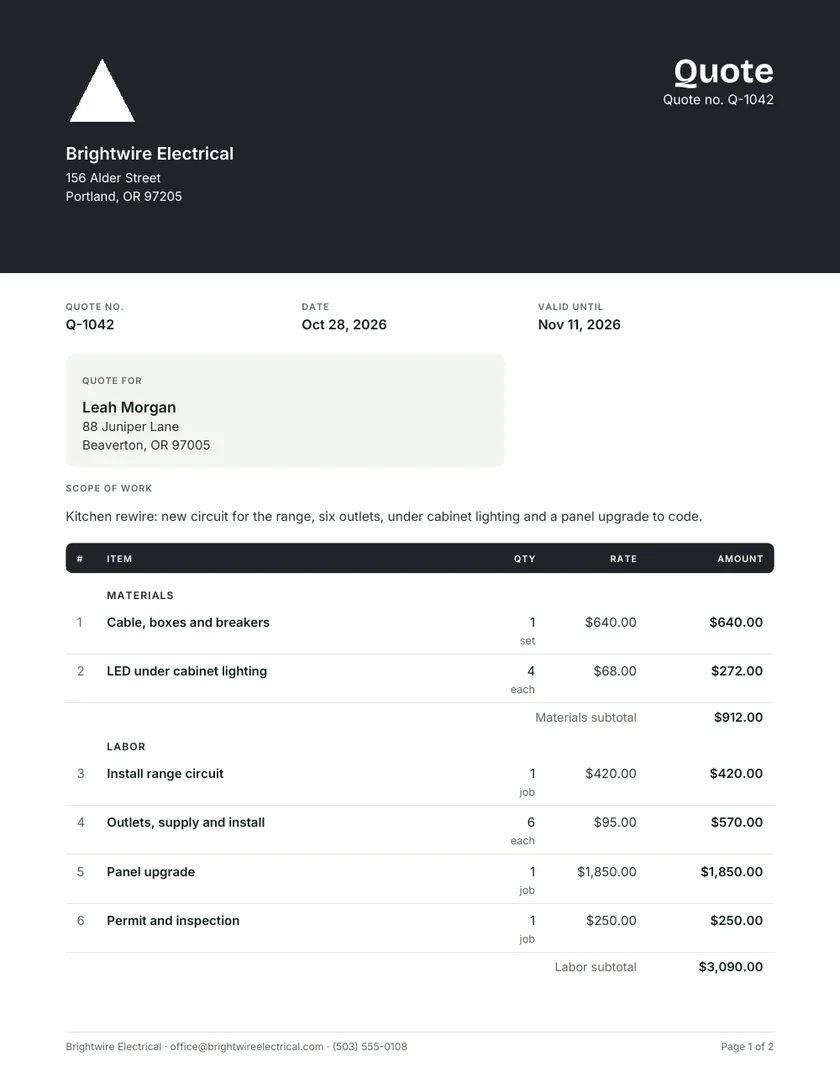
Here is the electrical sample from the quote maker taken all the way through. The customer accepted the kitchen rewire quote, paid a 25% deposit, and approved one extra outlet partway through the job. The invoice keeps every original line, adds the change and deducts the deposit already received.
| Line | Quote | Invoice |
|---|---|---|
| Cable, boxes and breakers | $640.00 | $640.00 |
| LED under cabinet lighting, 4 at $68 | $272.00 | $272.00 |
| Install range circuit | $420.00 | $420.00 |
| Outlets, supply and install, 6 at $95 | $570.00 | $570.00 |
| Panel upgrade | $1,850.00 | $1,850.00 |
| Permit and inspection | $250.00 | $250.00 |
| CO-1: extra outlet, 1 at $95 | Not on quote | $95.00 |
| Total | $4,002.00 | $4,097.00 |
| Deposit, 25% of the quote total | $1,000.50 requested | $1,000.50 received |
| Balance due | $3,096.50 |
The deposit was worked out on the quote total, so it stays at $1,000.50 even though the invoice total grew. Do not recalculate it as 25% of the new figure, because the customer paid a fixed sum. Tax is left out here to keep the arithmetic plain; if you charge it, apply it to the invoice subtotal the same way the quote did.
Showing deposits and stage payments on the final invoice
If you took money before the work, the final invoice must show it, or the customer will reasonably ask why they are billed the full price. List each payment received under the total, with its date, then show the balance due as the one figure to pay. Stage payments follow the same pattern.
Invoice total: $4,097.00
Less deposit received October 30, 2026: $1,000.50
Balance due by November 27, 2026: $3,096.50
On longer jobs you might bill in stages: a deposit when the quote is accepted, a progress invoice at rough in, and the final invoice at completion. Each one carries the same quote reference and lists what has been billed so far, so the last invoice claims only what remains. The guide to deposits on quotes covers how much to ask for up front. If you charge a fixed late fee, state it on the quote so it is no surprise when it appears on the invoice.
Quotation and invoice template: one file, two documents
This quote invoice template starts life as a quote, with grouped lines, tax and a deposit worked out by formula. When the job is finished, save a copy and turn that copy into the invoice, so both documents share the same lines, the same layout and a matching reference.
- Word. Change the heading from Quote to Invoice, replace Valid until with Due date, add the quote number as a reference, delete optional rows that were not chosen, and rename Deposit to book as Deposit received.
- Excel. In the Include? column, type Y for each optional line the customer chose and N for the rest, and the SUMIF subtotals follow. For a change order line, insert the row above the last line of its group and copy the Amount formula into it, so the group subtotal picks it up.
- The deposit cell. The Excel deposit is a percent of the total. Once the total changes, type the amount actually received over that formula, or the balance will be wrong.
- Keep both files. Save the invoice under a new name. The accepted quote is your record of what was agreed and should never be overwritten.
The same layout, filled for other trades, is in the library of quote templates.
Turning an accepted quote into an invoice in one click
Copying a quote into an invoice by hand works for a few jobs a month. Beyond that, the copying is where errors creep in: a missed change, a deposit not deducted, the wrong reference. Software that holds both documents can carry everything across for you and show whether the invoice has been paid.
WhizQuote is a WhizInvoice product. WhizInvoice sends and tracks quotes and invoices, turns an accepted quote into an invoice in one click and tracks payment, and you can start free with WhizInvoice. If you only need a single invoice right now, Invoice Maker HQ lets you make a free one. For how the two documents differ in purpose, read quote vs invoice.
Quote to invoice questions
How do I convert a quote into an invoice?
Open the accepted quote, copy the customer, scope and lines into an invoice, keep only the optional items the customer chose, and add any approved changes. Change the title to Invoice, give it an invoice number, date and due date, reference the quote number, deduct the deposit and send it.
Can I use a quote as an invoice?
Not as it stands. A quote invites acceptance, while an invoice asks for payment, so the title, number, dates and payment wording all differ. Reusing the quote’s lines is sensible, but sending the quote itself as a bill confuses the customer and your records. See quote vs invoice for the full comparison.
Should the invoice number match the quote number?
Keep two separate sequences, for example Q-1187 for quotes and INV-0452 for invoices, and print the quote number on the invoice as a reference. Not every quote becomes an invoice, so sharing one sequence would leave gaps in your invoice numbers. The quote numbering guide suggests formats.
How do I show a deposit on the final invoice?
Show the full invoice total first, then a line such as “Less deposit received October 30, 2026: $1,000.50”, then the balance due. Use the amount actually paid rather than a recalculated percent, and keep the date so the customer can match it to their own records.
What if the final price is different from the quote?
Explain every difference on the invoice. Approved changes appear as their own lines with change order references, and optional items the customer added appear as normal lines. If the original was an estimate rather than a fixed quote, show actual quantities against it. The guide to variations and change orders covers getting changes approved first.
Do I need a separate invoice for each stage payment?
Usually, yes. Issue an invoice for each payment you request, each with its own number and the same quote reference. List earlier payments on later invoices so the customer can see the running position, and make the final invoice show the total, everything already paid and the balance left.