Quotation format PDF that comes back signed
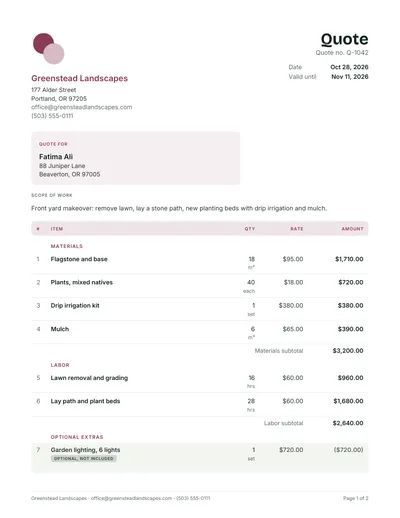
Send something that looks the same on every screen and printer. This two page US Letter quote has numbered lines, group subtotals, a 20% deposit and signature lines.
- An optional extra shown but kept out of the total
- Three ways to fill it in, including by hand
- Free to download, print and send

What the PDF quote template shows
A quotation format in PDF is the version your customer actually reads. Ours is a two page US Letter file with selectable text, numbered lines, group subtotals, an optional extra kept out of the total, a 20% deposit and signature lines. Here you will find when a PDF quote template beats Word or Excel, three ways to fill one in, and how to print it at the right size.
The sample is a front yard makeover for a landscaping business, set in the Forest design. It runs in the order a customer makes a decision: who is quoting and for whom, the job in one sentence, priced lines in groups, then the totals, the deposit and a place to sign.
- Paper
- US Letter, 8.5 x 11 in, two pages
- Text
- Selectable and searchable, not a scanned image
- Lines
- Numbered 1 to 7, grouped as Materials, Labor and Optional extras
- Optional item
- Garden lighting at $720, in brackets and marked optional, not included
- Totals
- Subtotal $5,840.00, Deposit to book (20%) $1,168.00, Balance on completion $4,672.00
- Acceptance
- A valid until reminder, then Signature, Name and Date lines
Because the words are real text, a customer can copy your quote number into a reply and a screen reader can read the lines aloud. A photographed or scanned quote can do neither.
When a PDF quote template is the better choice
Use a PDF for anything that leaves your hands. It looks identical on a phone, a laptop and paper, it cannot be edited by accident, and it opens without Word, Excel or any account. Keep an editable file for yourself and send the PDF as the copy both sides rely on if a question comes up later.
PDF is better for
- Sending to the customer by email or message
- Printing for a site meeting or to leave at the door
- A fixed record of what you offered and when
- Customers who will sign on paper or on screen
Keep an editable file for
- Drafting and changing prices
- Jobs you quote often with small changes
- Adding or removing many lines
- Working out tax and deposit, in the Excel version or the quote maker
Three ways to fill in a PDF quote
A PDF is a finished page, so the cleanest way to get one with your own details is to build the quote first and export it. If you already hold a PDF and only need to add a few words, a free reader can type on top of it. And a printed blank still works perfectly well with a pen.
- Build it, then downloadOpen the free quote maker, enter your business, customer and lines, and download the PDF. Totals, deposit and the valid until date are worked out for you, and you choose A4 or US Letter.
- Type on top of an existing PDFIn Adobe Acrobat Reader, the Fill and Sign tool lets you click anywhere and type. On a Mac, the text tool in Preview’s Markup toolbar does the same. Line the text up with the rows and check the sums yourself, because nothing recalculates.
- Print and write by handUse the blank quote template, which has empty rows, and fill it in on site.
Printing a PDF quotation at the right size
Print at actual size on the paper the file was made for. The sample is US Letter, so on A4 paper choose Fit or Shrink oversized pages in the print dialog, or the right edge and the signature lines may be clipped. Grayscale is fine: totals and labels stay readable without color, and it saves ink on long runs.
| Paper | Size | Usual in | Print setting |
|---|---|---|---|
| US Letter | 8.5 x 11 in (215.9 x 279.4 mm) | United States and Canada | Actual size |
| A4 | 210 x 297 mm (8.27 x 11.69 in) | Most other countries | Actual size for A4 files, Fit for Letter files |
Two pages print neatly double sided, flipped on the long edge. Print one copy for the customer and one for your own file, and staple each set before you hand it over.
Filling a printable PDF quotation by hand
Handwritten quotes are still common on site visits, and they hold up well when the arithmetic is shown and nothing is left vague. Write each line in full, with quantity, unit, rate and amount, then total the page in front of the customer so any question comes up before you drive away.
- Write money with cents ($1,710.00) and strike through unused rows with a single line, so nothing can be squeezed in later.
- If the customer adds the optional lighting, the subtotal becomes $6,560, the 20% deposit $1,312 and the balance $5,248. Write the new figures and both initial the change.
- Photograph the signed page before you leave, so a copy survives even if the paper goes missing.
An estimate template PDF for jobs you cannot price exactly
If hidden conditions could change the price, send an estimate instead of a quote. The layout stays the same, but the heading says Estimate and the total appears as a range with a short reason it might move. The customer reads it as a guide rather than a fixed promise, which protects both of you.
The estimate maker produces that PDF directly, with a low to high range under the total. For help deciding which document fits a job, see quote vs estimate.
Sending the PDF quote to a customer
Attach the PDF to a short email or message that states the total, the valid until date and how to accept. Put the total in the message itself, so the customer knows the headline figure before opening anything, and name the file so either of you can find it in a search months later.
- Use the quote number, customer and job in the file name, such as Q-1042 Ali front yard.pdf.
- The quote maker can email the PDF to you, so you can forward it from your usual inbox and replies come back to you.
- The quote email template has wording you can paste and adjust.
- Once the customer accepts, the same lines become the invoice; turning a quote into an invoice shows how.
PDF quote questions
What is a quotation format in PDF?
It is a quote saved as a fixed page: business details, quote number, dates, customer, priced lines, totals, terms and acceptance lines, in a file that looks the same everywhere. It is the format most customers expect to receive, because it opens on any device and cannot be changed by mistake.
Can I edit a PDF quote template?
Not the way you edit Word or Excel. You can type over it with Acrobat Reader’s Fill and Sign tool or Mac Preview, but the totals will not recalculate. To change prices properly, edit the Word or Excel version, or build the quote in the online maker, then make a fresh PDF.
How do I make a PDF quote for free?
Fill in the quote maker on this site and download the result. It is free, needs no sign up, adds no watermark, and produces a real PDF with selectable text in A4 or US Letter. Word and Excel can also save a PDF from the File menu if you prefer to work in those.
Can a customer sign a PDF quote?
Yes. They can print it, sign it and send back a photo or scan, or sign on screen with a free tool such as Acrobat Reader or Preview. However it comes back, keep the signed copy with the date you received it, and check that the quote number matches the version you sent.
Why does my PDF quote print cut off at the edges?
Usually the file is US Letter and the printer holds A4, or the other way round. Choose Fit or Shrink oversized pages in the print dialog instead of Actual size. Most printers also leave a small unprinted border, so scaling down slightly helps when the margins are tight.
Is a PDF quote legally binding?
The file format does not decide it. Depending on where you work, an accepted quote can form an agreement whether it was a PDF, a paper form or an email. Read is a quote legally binding for the general position and for how estimates are treated differently.