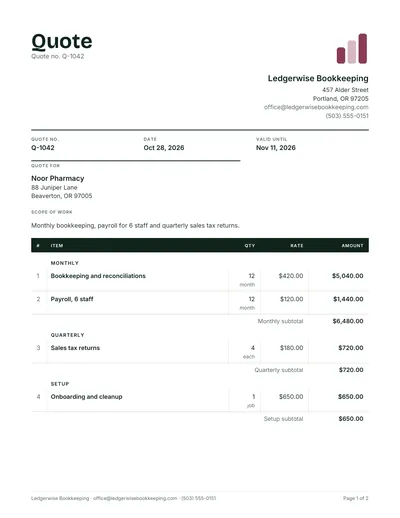
Quotation sheet that fits on one page
Long item lists and monthly work get messy in a letter style quote. Put each item on its own ruled row with quantity, unit, rate and amount, and totals underneath.
- Pharmacy bookkeeping priced monthly, quarterly and as a one time setup
- Use the same sheet to compare supplier prices
- Get it free as Word, Excel or PDF
What a quotation sheet is
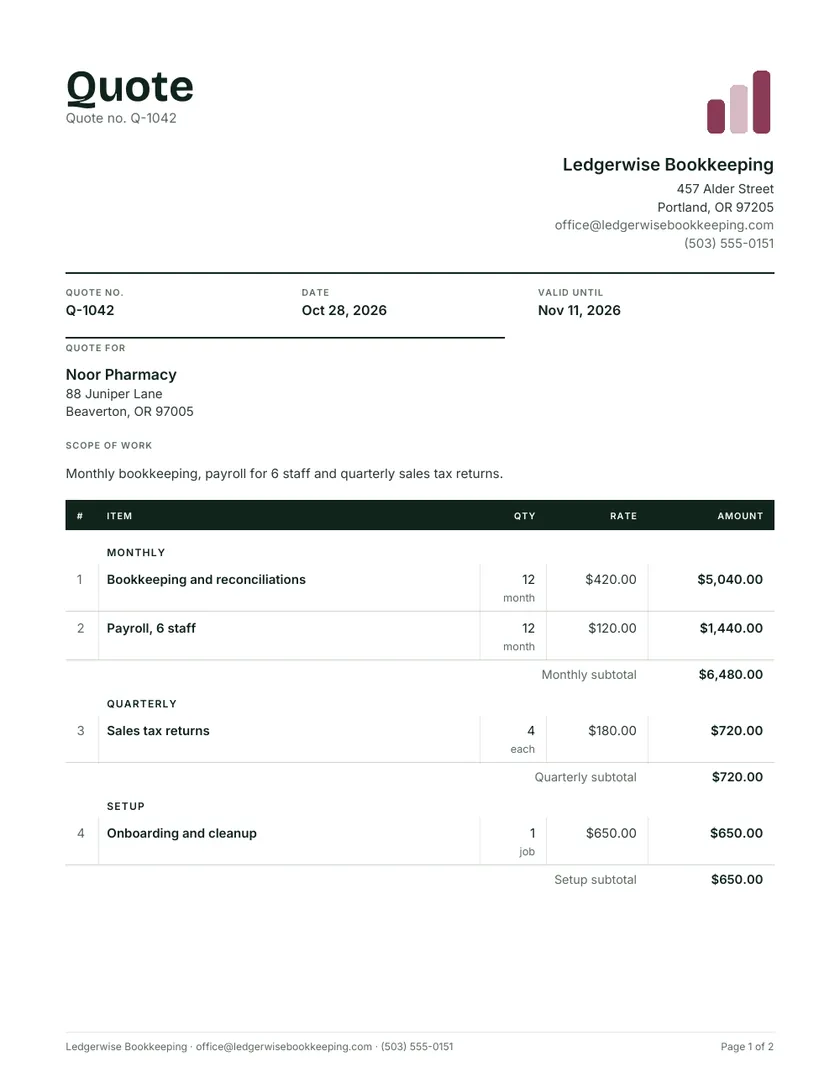
A quotation sheet puts everything on one ruled page: each item on its own row with quantity, unit, rate and amount, then the totals underneath. It is the layout to reach for when the list is long or the work repeats every month. The sample is a year of bookkeeping for a pharmacy, priced monthly, quarterly and as a one-time setup.
A quotation sheet is a one page, table led quote: rows of items with rates and amounts, ruled like a ledger, with only a short header and footer around them. It favors scanning over reading, so a customer can run a finger down the amount column and see where the money goes without wading through paragraphs of text.
Compared with a letter style quote, it says less in prose and more in rows. That suits recurring services, supply orders with many items and side by side price comparisons. It suits complex one-off jobs less well, because those need a long written scope that a grid cannot hold. The sample uses the Ledger design, with a stacked header, dark column headings and ruled rows.
Quotation sheet format, column by column
Keep the grid tight: six or seven narrow columns, one row per item, and nothing in the table that is not a number or a short label. Any detail that will not fit in a few words goes into a separate Detail column or a note below the grid, never wrapped over three lines inside a single row.
| Column | Width | Notes |
|---|---|---|
| Item | Widest | Short name, such as Payroll, 6 staff |
| Detail | Medium | Frequency, specification or reference |
| Qty | Narrow | Months, units or visits |
| Unit | Narrow | month, each, hrs, visit |
| Rate | Narrow | Price for one unit |
| Amount | Narrow | Qty times rate |
| Include? | Narrow, Excel only | Y or N, for optional rows |
The Excel version uses exactly these columns, with amounts and group subtotals as formulas. The Excel quote template page maps every cell.
Pricing recurring work on a quote sheet
For monthly or quarterly services, price a full year: twelve monthly charges become one line with a quantity of 12, and four quarterly returns become a quantity of 4. The customer sees the annual commitment in the total, while the monthly figure stays visible in the rate column for anyone budgeting month to month.
| Group | Line | Qty x rate | Amount |
|---|---|---|---|
| Monthly | Bookkeeping and reconciliations | 12 x $420 | $5,040.00 |
| Monthly | Payroll, 6 staff | 12 x $120 | $1,440.00 |
| Quarterly | Sales tax returns | 4 x $180 | $720.00 |
| Setup | Onboarding and cleanup | 1 job | $650.00 |
| Total for the first year | $7,850.00 | ||
Grouping by frequency gives each block its own subtotal: $6,480 of monthly work, $720 quarterly and $650 one time. Year two drops the setup line, so say so in the terms, for example: from month 13 the monthly fee is $540. All figures here are examples.
Fitting the quote on one sheet of paper
One page is the promise of this layout, so trim before you shrink. Shorten item names, move long descriptions into the Detail column, combine tiny lines the customer does not need to see separately, and only then reduce the font size or scale the printout to fit the width of the page.
- In Excel or Google Sheets, print all columns on one page wide. The downloaded Excel file is already set up this way.
- In Word, reduce the cell padding in Table Properties rather than dropping the text below about 9 pt.
- Keep terms to three or four lines under the grid, and point to full terms on your website if you have them.
- Landscape orientation helps when you need extra columns, such as a per line discount.
Using a quote sheet template to compare supplier prices
The same grid works in reverse when you are the buyer. List the items you need down the side, give each supplier its own column, and enter their unit prices from the quotes they send. The totals row shows the cheapest overall, and any empty cell shows a supplier who did not price every item.
| Item | Qty | Supplier A | Supplier B | Supplier C |
|---|---|---|---|---|
| Printer paper, box | 10 | $42.00 | $39.50 | $44.00 |
| Toner, black | 4 | $88.00 | $92.00 | $85.00 |
| Total | $772.00 | $763.00 | $780.00 |
Supplier B wins here by $9 even though it is dearest on toner. Send every supplier the same list first, using a request for quotation template, so each price covers the same item and quantity.
When to pick a quotation sheet
Pick it when the list is long, the work repeats, or the reader wants to compare figures quickly: bookkeeping, cleaning contracts, maintenance schedules and supply orders. Choose a layout with more room for words when the job needs a detailed scope, conditions or design explanations that rows and columns cannot carry.
Suits
- Monthly or quarterly service contracts
- Supply orders with 15 or more items
- Customers who print and file quotes
- Comparing prices from several suppliers
Look elsewhere for
- One-off jobs with a complex scope: the professional quote template
- A quick price for one item: the price quote template
- Time based work with assumptions: a quotation for services
- More lines for bookkeepers: the accounting quote template
Quote sheet questions
What is a quote sheet used for?
To price a list of items or services on one page, with quantities, rates and totals in a ruled grid. Businesses send them for supply orders and recurring services, and buyers use the same layout to compare quotes from several suppliers side by side before choosing one.
How do I make a quote sheet in Excel?
Set up columns for item, detail, qty, unit, rate and amount, make each amount =ROUND(qty*rate,2), and total each group with SUM or SUMIF. Add tax, total and any deposit underneath. The Excel file from this page has the formulas built in, including an Include column for optional rows.
Should recurring services be quoted monthly or yearly?
Show both. Price each service per month in the rate column and use a quantity of 12 so the total shows the annual cost, then state the monthly payment in the terms. The customer sees the real commitment, and nobody is surprised when the first full year is added up.
Can I add optional items to a quote sheet?
Yes. Add them as rows marked optional and keep their amounts out of the total. In the Excel file, set Include? to N for those rows. In the quote maker, mark the line as optional and it shows as Optional, outside the total, until the customer chooses it.
How many items fit on one page?
With short item names and single line rows, a Letter or A4 page holds roughly 25 to 30 rows plus the header and totals. If you need more, group small items, move detail into notes, or accept a second page and repeat the column headings at the top of it.
Is a quote sheet the same as a price list?
No. A quote sheet is made for one customer and one set of quantities, with a date and an expiry. A price list shows standard prices to everyone, with no quantities or customer named. Many businesses keep a price list and copy lines from it into each quote.