Estimate Maker: Free Estimate Generator for Contractors
Make a professional estimate in your browser: line items, an estimated total with a low to high range, a deposit and a valid until date. Download the PDF or email it to yourself. Free, with no sign up.

An estimate that shows the range, not only a number.
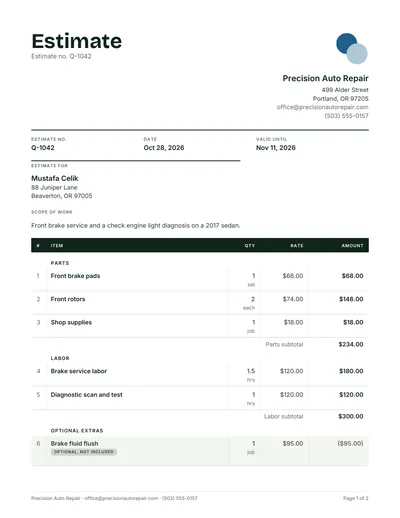
Customers accept an estimate more readily when they can see how far the price might move. This estimate generator prints your line items, the estimated total and a low to high band, and keeps the wording honest: Estimate, Estimated total, Valid until.
- Range
- A percentage you set, shown as low to high beside the total
- Wording
- Estimate and Estimated total, never Quote, so nobody mistakes it for a fixed price
- Allowances
- Lines for items still to be chosen, marked as allowances in the detail
- Extras
- Optional lines kept out of the total until the customer picks them
- Deposit
- A percent or an amount, if you need one to hold the date
- Next step
- Fix the price later in the quote maker with the same lines
How to make an estimate in five steps
Built for contractors and service businesses who price before every detail is known.
- Describe what you can seeWrite the scope as you understand it today, and name what you have not been able to inspect yet, such as behind walls or under flooring.
- List the work as line itemsGroup materials and labor, give each line a quantity and a unit, and use allowances for fixtures the customer has not chosen.
- Set the rangePick a percentage that matches the unknowns. A clear interior job might carry 5%, an old house with hidden conditions 15% or more.
- Say what would change the priceAdd a short note on the assumptions behind the number and how changes will be priced, so a revised figure is never a surprise.
- Download, send and follow upSend the PDF the same day, then follow up before the valid until date. When the scope is firm, issue a fixed quote.
For a deeper walk through with wording examples, read how to write an estimate.
Estimate or quote: which one to send
Use the estimate maker while the scope can still move, and the quote maker when you are ready to commit to a price.
| Estimate | Quote | |
|---|---|---|
| What it promises | Your best guess, which may change | A fixed price for the work described |
| Best for | Repairs, renovations, hidden conditions | Defined jobs you have fully inspected |
| Shows a range | Yes, low to high | No, one total |
| Typical validity | Short, while costs hold | 7, 14 or 30 days |
| Tool | Estimate maker | Quote maker |



Estimate maker questions
Short answers first. Something missing? Ask us.
Is this estimate maker free?
Yes. The estimate maker is free with no account, no watermark and no limit. It runs in your browser, so the PDF is made on your device and you can download it, print it or email it to yourself straight away.
What is the difference between an estimate and a quote?
An estimate is your best informed guess at the price, which can change once the work starts. A quote is a fixed price for the work described. Send an estimate when you cannot see everything yet, then a quote when the scope is firm. The quote vs estimate guide covers the wording.
How does the price range work?
Switch on the range and set a percentage, for example 10%. The estimate keeps your line items and shows the estimated total plus a low to high band around it, so the customer sees both the likely figure and how far it could move.
Can I turn an estimate into a quote later?
Yes. When the scope is settled, open the quote maker, add the same lines and fix the price. Your business details and logo are remembered in the browser, so it takes a minute.
Should an estimate include tax?
Yes, if you charge it. Choose your country and the estimate shows GST, VAT or sales tax at the right rate, with prices tax added or tax included. Customers compare totals, so say clearly which one you used.
What should a contractor estimate include?
Your business and the customer, an estimate number and date, how long it stays valid, a short scope, line items with quantities and rates, the estimated total and range, what could change the price, exclusions and how to accept. The contractor estimate template shows a filled example.